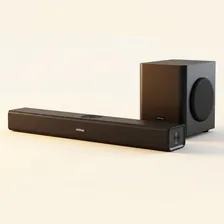
Soundbars and home-theatre systems are quietly long-lived devices that often outlast the TVs they were originally bought to accompany. The single most useful habit is keeping the speaker grilles clean — dust accumulating in the cloth or perforated metal grille progressively muffles the sound in ways that get blamed on the speaker ageing rather than simply needing a vacuum. A monthly pass with a soft brush attachment on a vacuum cleaner, on the lowest suction setting, takes thirty seconds and keeps the sound as crisp as the day the soundbar was unboxed. For wall-mounted soundbars, also dust the top edge, where settled dust periodically falls into the grille and accelerates the muffling.
Connection management is the silent factor that determines how good a soundbar sounds in years three through five. HDMI cables work themselves slightly loose over years of TV adjustment, optical cables develop intermittent contact issues at their connectors, and HDMI-CEC settings sometimes drift after firmware updates on the TV or soundbar. Once a year, push every connector firmly back into its socket, run the soundbar's setup or calibration routine again, and verify that surround channels (if applicable) are still routing correctly. Subwoofer pairing also occasionally drifts on wireless models and may need re-pairing through a brief setup procedure in the app.
Firmware updates arrive infrequently on soundbars but often add real audio improvements, support for new spatial audio formats, or better TV integration. Check for updates every six months. As the soundbar ages, evaluate whether it still has the connections you need — older models with only optical inputs limit you to lower-quality audio formats compared to modern HDMI eARC. When upgrading, older soundbars often have a productive second life in bedrooms, home offices, garages, or workshop areas where the audio standard doesn't need to be cutting edge. Recycle through certified e-waste channels when the time finally comes.
Room acoustics quietly determine how good any soundbar sounds, and small adjustments often produce bigger improvements than expensive equipment changes. Hard surfaces directly opposite the soundbar (large mirrors, glass coffee tables, polished floors) cause harsh reflections that exaggerate sibilance and muddy dialogue; a single area rug between the soundbar and your seating position often resolves the most distracting issues. Run the soundbar's automatic room calibration routine if it has one, and re-run it whenever you significantly rearrange furniture. For wireless surround speakers and subwoofers, take the time to position them carefully — moving a subwoofer just half a metre can transform the bass response, and pulling rear speakers slightly forward of the listening position often opens up the surround field dramatically without spending another penny on hardware.
 NationRepair