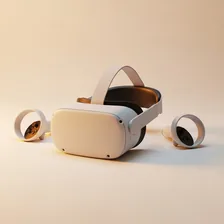
VR Headsets

VR Headsets

Complete repair and maintenance guide for virtual reality headsets

VR headsets deliver experiences that no flat screen can match — but the technology that makes them possible is genuinely complex, with high-resolution displays, multiple tracking sensors, motion controllers, and demanding processing requirements. Lens fogging during use, controller tracking failures, image quality concerns, controller pairing problems, motion sickness from lag, and PC compatibility issues are the most common challenges VR users face. Most are fixable with cleaning, calibration, software updates, or settings adjustments rather than warranty repairs. This guide covers every common VR headset issue with clear, practical fixes that keep your virtual experiences smooth and comfortable.

Understanding VR Headsets

VR headsets create immersive 3D environments by displaying separate images to each eye via tiny screens, combined with motion tracking that updates the view as you turn your head and move your body. The category split between standalone headsets (Meta Quest, Apple Vision Pro, Pico) — which include their own processors, batteries, and storage — and PC-tethered headsets (Valve Index, HP Reverb) that rely on a connected gaming PC for processing. Standalone headsets dominate the consumer market because they require no setup beyond opening the box and putting on the headset.

VR has matured from a curiosity into a mainstream entertainment platform with a substantial library of games, fitness apps, productivity tools, and increasingly business applications. The main challenges remain comfort during extended sessions (headsets are heavy and create face fatigue), motion sickness for some users (typically improves with experience), the need for a clear physical space to move around, and the cost of high-end systems ($500–$3,500+).

Common Problems

1

Lenses Fogging Up During Use

VR lens fogging is most commonly caused by face heat warming the cool lens surface during physical play, causing condensation. Anti-fog wipes, allowing the headset to warm up before use, and proper ventilation around the face cushion all reduce fogging significantly.

2

Controller Tracking Losing Position

Controller tracking failures are typically caused by insufficient lighting in the play space, reflective surfaces confusing the tracking cameras, or the controllers being held outside the headset cameras' field of view during hand movements.

3

Display Resolution Appearing Low or Blurry

Display blurriness in VR is usually caused by the lenses being smudged with skin oils, the headset not being properly fitted to align lenses with the eyes, or the IPD (interpupillary distance) setting being incorrect for the user's eye spacing.

4

Controllers Not Pairing with Headset

Controller pairing failures are most commonly caused by depleted controller batteries, the controllers having lost their pairing data, or the controllers being stored too close together causing them to interfere with each other during pairing.

5

Motion Sickness from Display Lag

VR motion sickness from lag is typically caused by the headset PC connection being insufficient for the resolution and refresh rate being used, GPU performance being inadequate for the game settings, or wireless VR experiencing latency spikes.

6

Software Compatibility Issues with PC

PC VR software compatibility problems are most commonly caused by outdated VR runtime software, GPU drivers needing updates, or USB controller issues affecting the headset's data and power connection to the computer.

Why VR Headsets Fail

VR headsets endure unique stresses no other consumer electronic experiences. They get thrown around during gameplay, dropped, stepped on, and exposed to face oils and sweat for hours of use. The most common failures involve face padding (which absorbs sweat, dust, and skin oils — most quality headsets have replaceable pads), head straps (which crack at hinge points), and lenses (which scratch easily from fabric contact and cleaning attempts).

The internal electronics fail less often but battery life is a constant concern in standalone headsets. Quest 2 and Quest 3 batteries deliver 2–3 hours of typical use when new, declining to 1–2 hours after a few years. Hardware-level failures involve display panels (occasional dead pixels or backlight issues) and tracking sensor degradation that affects controller positioning accuracy. Controllers themselves are subject to the same drift issues that affect gaming console controllers.

Repair & Fix Guides

Maintenance Tips

  • Clean lenses with a microfibre cloth and lens-safe solution monthly
  • Replace face cushions every 6-12 months to maintain hygiene and comfort
  • Charge controllers between sessions to prevent battery degradation over time
  • Keep play space well-lit and free of reflective surfaces for reliable tracking
  • Update VR runtime and GPU drivers regularly for performance and stability

Repair, Replace & Buying Advice

VR is one of the few categories where new generations represent significant practical improvements — better resolution, better tracking, better comfort, better processors. A 5-year-old VR headset is genuinely much worse than a current one. That said, if your current headset still does what you need it to and runs the apps you use, there's no urgency to upgrade.

When buying new, the most important specifications are display resolution per eye (2160×2160 minimum for current standards), refresh rate (90 Hz minimum, 120 Hz preferred for comfort), comfort and weight balance, battery life (for standalone units), tracking quality, controller design, and content library. Standalone is the simpler choice for most users; PC-tethered is for enthusiasts who want maximum visual fidelity and have the gaming PC to support it.

Long-Term Care & Best Practices

VR headsets are unusual among consumer electronics because they're worn against the face and through vigorous physical movement, which creates a unique set of long-term care priorities. The most important habit is wiping down the facial interface (the foam or fabric pad that touches your face) after every session, and replacing it every six to twelve months. Replacement facial interfaces cost $15–$30 from the manufacturer or third-party makers, and switching to a wipeable silicone or PU leather cover instead of the original cloth foam dramatically improves hygiene and extends comfort over multi-hour sessions. Sweat is unavoidable in VR — managing it correctly is the difference between a headset that gets used and one that gets shelved.

Lens care prevents one of the most expensive forms of damage in VR. Never leave a headset where direct sunlight can reach the lenses, even briefly — the lenses act as magnifying glasses and can focus sunlight onto the OLED or LCD panels behind them, burning permanent dark spots into the displays in seconds. Always store the headset face-down or in its included cover, and never on a window ledge or anywhere a sunbeam might cross during the day. Clean the lenses only with a clean dry microfibre cloth in gentle circular motions; lens-cleaning solutions can damage the anti-reflective coating that gives VR its sharp clarity.

Controller batteries and tracking calibration are the ongoing maintenance items. Use lithium AA batteries in controllers that take user-replaceable cells because they last roughly three times longer than alkaline and cost less than disposable alkaline over the controller's life. Re-run the headset's room setup or guardian system every few months to ensure tracking remains accurate, especially if you've rearranged furniture or changed the lighting in your play space. As the headset ages, software updates often add new features or improve performance significantly, so check for updates every couple of months and install them before they accumulate.

Strap and weight-distribution upgrades are some of the highest-value modifications available for any VR headset because comfort directly determines how often the headset gets used. The cloth or elastic strap that ships in the box on most consumer VR headsets is a deliberate cost compromise; replacing it with a rigid halo-style strap with a top counterweight ($30–$80 from third-party makers) often transforms a headset that gets used for thirty-minute sessions into one that's comfortable for two-hour sessions. Cable management also matters for tethered headsets — a simple ceiling pulley setup keeps the cable out of your feet during room-scale play and dramatically reduces the cable wear that eventually causes signal dropouts and the need for expensive cable replacement.

Quick Tips

Adjust IPD setting before assuming the display is blurry — wrong IPD looks like soft focus

Use anti-fog spray on lenses for active VR sessions to prevent fogging

Charge controllers before long sessions — empty controllers cause tracking failures

Frequently Asked Questions

Why do I get nauseous in VR and will it ever stop?

VR motion sickness comes from your inner ear sensing one type of movement while your eyes see another. Most users adapt within hours over the first few weeks of use. To accelerate adaptation, start with stationary or slow-movement experiences (cockpit games, room-scale games where you physically move), avoid artificial smooth locomotion at first, and stop immediately when you feel discomfort rather than pushing through. Eat light before VR sessions and ensure good ventilation.

How do I clean my VR headset properly?

For lenses, use only a clean dry microfibre cloth or wipes specifically designed for camera lenses. Never use alcohol, ammonia, or paper products on VR lenses — they damage the anti-reflective coating permanently. For face pads, remove and wipe with a damp cloth (no soaps that contain alcohol or strong solvents). For exterior plastic, any standard electronics wipe works. Replace face pads every 6–12 months for hygiene.

Can I wear glasses with a VR headset?

Most VR headsets accommodate glasses, but the experience is suboptimal — glasses can scratch the headset lenses, fog up from heat, and create discomfort against the face padding. Many users get prescription lens inserts (third-party services like VR Optician make custom inserts for most headset models for $50–$120). The inserts attach magnetically to the headset's lenses and provide vision correction without glasses.

How long does a VR headset battery last per charge?

Standalone headsets like Meta Quest deliver 2–3 hours when new, dropping to 1–2 hours after several years of use. Power-intensive games drain batteries faster. Battery packs that mount to the head strap can extend session time by 4–8+ hours but add weight. PC-tethered headsets draw power through their cable from the PC and have no battery limit.

Is VR worth it or just a gimmick?

Depends on what you want from it. For gaming, certain genres (rhythm games, simulation, exploration) are dramatically better in VR than on a flat screen. For fitness, VR has surprised many users by becoming their primary workout method. For productivity, the case is weaker — most users return to flat monitors for daily work. Try a friend's headset or visit a VR arcade before committing to a purchase.

Step-by-Step Repair Tutorials

Hands-on tutorials covering the most common VR Headsets repairs.

Recommended Learning Guides

Background knowledge from the Learning Center to help you understand and care for VR Headsets.

Related Guides