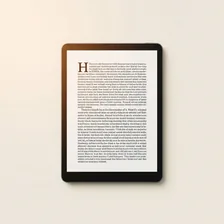
E-Readers

E-Readers

Complete repair, care and maintenance guide for e-ink reading devices

E-readers use specialised electronic ink displays that read like paper, last weeks on a single charge, and are far gentler on the eyes than backlit smartphone or tablet screens. They have become essential travel and bedtime companions for serious readers. Their relative simplicity does not make them immune to problems — frozen screens, Wi-Fi connection failures, touchscreen sensitivity issues, and gradually shortening battery life are all common complaints. Most of these issues stem from software glitches that a forced restart resolves, with hardware faults being rarer than on more complex devices. This guide explains every common e-reader issue and the simple fix that usually resolves it.

Understanding E-Readers

E-readers occupy a deliberately narrow niche: dedicated devices for reading text, optimised for long battery life, eye comfort under direct sunlight, and freedom from the distraction of email, social media, and notifications. The dominant brands are Amazon Kindle, Kobo, Onyx Boox, and PocketBook, each with their own ecosystem of bookstores and library integrations. E-ink technology — the foundation of every modern e-reader — uses electrically charged microcapsules to flip black or white pixels into place, holding the image with no power until the next page turn.

The defining advantages of e-ink over a tablet are battery life measured in weeks rather than hours, perfect readability in bright outdoor light, and freedom from the eye strain that comes with hours of looking at a backlit screen. The tradeoffs are slow refresh (which makes them poor for video or fast scrolling), no colour on most models, and a price premium relative to what equivalent hardware would cost in a basic tablet. For dedicated readers, those tradeoffs are well worth it.

Common Problems

1

Screen Frozen or Completely Unresponsive

A frozen e-ink display is almost always caused by a software crash that holding the power button for 20-30 seconds will resolve. The display appears stuck because e-ink only refreshes when the device commands it — so a frozen image can be misinterpreted as a hardware failure when it is actually a software hang.

2

Wi-Fi Not Connecting to Download Books

Wi-Fi connection failures on e-readers are most commonly caused by router compatibility issues with older e-reader hardware, particularly with newer Wi-Fi 6 routers. Forgetting the network and rejoining, or temporarily switching the router to a 2.4 GHz only mode, resolves most e-reader connection problems.

3

Touchscreen Not Registering Taps Accurately

Erratic touchscreen behaviour on an e-reader is typically caused by skin oils and dust building up on the screen surface or by a screen protector that has lifted at the edges. Cleaning the screen with a barely-damp microfibre cloth resolves most touch sensitivity problems instantly.

4

Battery Draining Faster Than Expected

E-readers should last weeks on a charge, so noticeable battery drain typically points to Wi-Fi being left on continuously, the device repeatedly trying to sync, or the battery itself reaching end of life after several years of regular charging cycles.

5

Storage Full and Unable to Download Content

Although e-books are small files, downloaded magazines, audiobooks, and PDF documents accumulate over time and can fill even larger e-reader storage. Removing old content from the device while keeping it in the cloud library is the standard solution.

6

Device Not Turning On At All

An e-reader that will not turn on is usually completely battery-discharged rather than hardware-failed, particularly if it has been stored unused for many months. Charging for at least 30 minutes before attempting to turn on resolves most "dead device" complaints on e-readers.

Why E-Readers Fail

E-ink screens are the most common failure point. While the e-ink layer itself is robust, the glass that covers it cracks easily under pressure or impact, and a cracked e-ink screen typically shows a permanent dark stain or fragmented page rather than the spiderweb crack pattern of an LCD. Replacement screens for major brands cost $60–$150 in parts, but the labour to install them is delicate and often makes professional repair uneconomical.

Battery degradation in e-readers is much slower than in phones or tablets because the screen draws zero power when not refreshing. Most users get 4–6 years out of an e-reader battery before noticeable runtime loss. Charging ports are the more typical failure point — micro-USB ports in older models wear quickly, USB-C in newer models is more durable. Software issues like frozen page turns or library sync failures are usually fixed by a force-restart (hold the power button 20+ seconds).

Repair & Fix Guides

Maintenance Tips

  • Clean the screen monthly with a barely-damp microfibre cloth to maintain touch sensitivity
  • Keep Wi-Fi off when not actively syncing to extend battery life dramatically
  • Store the e-reader at 50% charge if not using for more than a month
  • Use a quality cover to protect the e-ink screen from cracks and pressure damage
  • Update e-reader firmware when prompted for the latest features and bug fixes

Repair, Replace & Buying Advice

An e-reader without screen damage is almost always worth keeping. The reading experience hasn't changed dramatically across generations — a 5-year-old Kindle reads books just as well as the current model, just with a slightly less crisp display and slower page turns. The main upgrade reasons are warmer-tone backlighting (much easier on the eyes for night reading), larger or higher-resolution screens, and waterproofing for bath and beach reading.

When buying new, the specifications that matter are screen size (6-inch is the pocket standard, 7+ inch is much more comfortable for older eyes), backlight quality (warmer adjustable colour is far better for long sessions), waterproofing if you read near water, page-turn buttons (some readers have given up on physical buttons in favour of touch only — a real downgrade for one-handed reading), and storage (8 GB easily holds thousands of books, more matters only for graphic novels).

Long-Term Care & Best Practices

E-readers are the longest-lasting electronics in most people's homes precisely because they are simple devices used sparingly. The single best maintenance habit is keeping the device in a folio cover whenever it's not being read. The screen is glass-and-plastic that scratches easily against keys, coins, and pens in a bag, and unlike a phone these scratches are highly visible because of the matte E Ink finish. A good cover also protects against the most common failure: a single drop onto a hard floor that cracks the screen. Replacement screens are uncommon in service catalogues, so prevention is genuinely the only practical option for keeping a Kindle or Kobo in service for the decade that the rest of the hardware is happy to last.

Battery management on E Ink devices is unusually forgiving because they sip power only when refreshing the page, but a few simple habits extend battery life dramatically. Turning Wi-Fi off when you're not actively syncing books is the biggest win — leaving it on can drain the battery from full to empty in a couple of weeks of standby. Charging from a 5W phone charger rather than a fast charger keeps internal heat low and battery wear minimal. Avoid storing the e-reader in a hot car or near a sunny window for extended periods; heat plus the always-on screen layer is the only common combination that prematurely ages an otherwise robust device.

Software updates roll out slowly on e-readers and often add genuinely useful features (better fonts, faster page turns, library improvements) for free. Connect to Wi-Fi every couple of months specifically to download updates, then turn it back off for normal use. When the device truly reaches end of life — usually because the battery has degraded to the point where it doesn't last between charges — most quality e-readers can have their batteries replaced by independent repair shops for $30–$50 in parts. Unlike phones and tablets, the screen and electronics on e-readers tend to outlast everything else, so a single battery replacement often gives the device a second decade of useful life.

Quick Tips

Hold power button for 30 seconds to force restart any frozen e-reader instantly

Turn off Wi-Fi when not syncing to extend battery life from days to weeks

Charge for 30 minutes before assuming a "dead" e-reader has actually failed

Frequently Asked Questions

How long should an e-reader battery last on a single charge?

Modern e-readers running standard text deliver 4–8 weeks of typical reading on a single charge. Backlight use cuts that significantly — leaving the light on at maximum brightness for night reading might reduce a 6-week charge to 2 weeks. After several years, batteries lose capacity and these numbers may halve. Replacement is possible but rarely offered through manufacturer service channels.

Why is a strange dark stain on my screen?

Almost certainly a cracked e-ink layer underneath the glass. Unlike LCD damage that shows as visible cracks, e-ink damage shows as permanent dark patches because the broken capsules can't reset to white. The damage is permanent and does not spread, but the affected area becomes unreadable. Screen replacement is the only fix; in most cases it's cheaper to replace the device.

Can I read regular PDFs on an e-reader?

Yes, but the experience varies. Most e-readers display PDFs but struggle with two-column academic papers, complex layouts, or anything not designed for a 6-inch screen. Larger 10-inch e-readers (Boox, Kindle Scribe) handle PDFs much better. For ePub books — the standard e-reader format — you can convert most PDFs using free tools like Calibre for a much smoother reading experience.

Why are page turns slow or showing ghost images of the previous page?

E-ink screens accumulate visual residue from previous pages because they only refresh the pixels that changed. Most e-readers do a full screen refresh (briefly turning the page black) every 5–10 page turns to clear residue. If ghosting is excessive, increase the full-refresh frequency in settings or restart the device.

Should I leave my e-reader plugged in all the time?

Battery health degrades faster when held at 100% constantly. If your e-reader sits on the bedside table indefinitely, unplug it once charged and let it run down to 30–40% before recharging. This pattern of partial discharge and recharge is the gentlest treatment for lithium-ion chemistry and can extend battery life by years.

Step-by-Step Repair Tutorials

Hands-on tutorials covering the most common E-Readers repairs.

Recommended Learning Guides

Background knowledge from the Learning Center to help you understand and care for E-Readers.

Related Guides