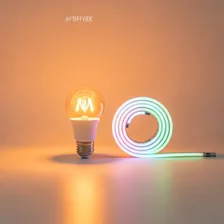
Smart Lighting Systems

Smart Lighting Systems

Complete repair and maintenance guide for smart lighting

Smart lighting transforms how you experience your home — colour-changing scenes for relaxation, gradual sunrise wake-up routines, automated outdoor lights, and instant scene changes from your phone or voice. As your lighting system grows from a few bulbs to full-room coverage, the chances of connection issues, unresponsive bulbs, colour inconsistencies, hub problems, and voice control failures increase. App command failures, lights turning on randomly, colour mismatches between bulbs, hub disconnections, voice control problems, and dimming flicker are the most common complaints. Most are fixable through hub resets, network optimisation, or firmware updates. This guide covers every common smart lighting issue with practical fixes.

Understanding Smart Lighting Systems

Smart lighting has matured from a novelty into a mainstream home upgrade. The category covers smart bulbs (Philips Hue, LIFX, Wyze, IKEA Trådfri), smart switches (Lutron, Leviton, Kasa), and accent lighting strips (Govee, Nanoleaf). The defining capabilities are programmable colour and brightness, scheduled and triggered automation, voice and app control, and integration with broader home automation platforms. The energy savings of LED smart bulbs over older incandescent bulbs is substantial — a 60-watt-equivalent smart LED uses 8–10 watts and lasts 15+ years of typical use.

The choice between smart bulbs and smart switches is fundamental to any installation. Smart bulbs offer maximum flexibility — colour, dimming, individual control — but require the wall switch to remain on at all times, breaking the natural habit of switching lights with the wall. Smart switches preserve normal wall switch operation while adding remote control and scheduling, but lose colour and individual bulb control. For most rooms, smart switches are the more livable choice for primary lighting, with smart bulbs reserved for accent and creative lighting where colour matters.

Common Problems

1

Bulbs Not Responding to App Commands

Bulbs failing to respond to app commands are typically caused by the bulb being out of range from the hub, the bulb power being switched off at the wall, or the bulb having lost its pairing with the hub and requiring re-pairing.

2

Lights Turning On or Off Randomly

Lights turning on or off unexpectedly are usually caused by automation routines being triggered by motion sensors, scheduled scenes that have been forgotten about, or — for some bulbs — voice assistants picking up commands from background audio.

3

Colour Accuracy Inconsistent Between Bulbs

Colour inconsistencies between identical bulbs are typically caused by manufacturing variations, bulbs from different production batches, or one bulb running outdated firmware that has not received the latest colour calibration improvements.

4

Hub Losing Connection to Bulbs

Hub-to-bulb disconnections are most commonly caused by interference from other 2.4 GHz devices, the hub being placed too far from the bulbs it controls, or microwave ovens and baby monitors temporarily disrupting the wireless mesh network.

5

Voice Control Not Working with Lights

Voice control failures with smart lights are typically caused by the voice assistant integration losing authentication, room or device names being changed in the lighting app, or voice training not recognising the specific command phrasing being used.

6

Bulbs Flickering When Dimmed

Bulb flicker during dimming is usually caused by incompatibility between smart bulbs and existing wall dimmer switches, low-quality dimmer drivers in the bulb, or — for very low brightness levels — the bulbs operating at the edge of their dimming range.

Why Smart Lighting Systems Fail

Smart bulbs typically last 15–25 years of light output but the smart electronics inside often fail much sooner. Heat is the biggest factor — bulbs in enclosed fixtures or pointing downward get significantly hotter than bulbs in open fixtures, and the Wi-Fi or Zigbee chip is heat-sensitive. After 3–5 years in a hot fixture, smart bulbs start losing pairing memory, becoming unresponsive, or flickering. Bulbs in cool, open fixtures last much longer.

Smart switches face different failure modes. Wi-Fi switches can lose connectivity after router changes or firmware updates. Some require a neutral wire that older homes don't have, leading to installation difficulties. Touchscreen and capacitive button switches are vulnerable to grime and grease accumulation that affects responsiveness. Smart relays inside switches occasionally fail, leaving the light either always on or always off until replacement. Cloud service outages can disable remote control even when local switch operation continues working.

Repair & Fix Guides

Maintenance Tips

  • Keep bulb firmware updated through the app for the latest colour and stability improvements
  • Replace bulbs from the same brand and batch where possible for the most consistent colour
  • Position the hub centrally and away from interference sources for best mesh network performance
  • Avoid using smart bulbs with traditional wall dimmers — incompatibility causes flicker
  • Document your scenes and routines so you can recreate them after major system resets

Repair, Replace & Buying Advice

Smart bulbs that have stopped responding to commands or have lost colour quality should be replaced — repair isn't possible. Stick with the same brand and ecosystem if you have other smart lighting products to maintain unified control. For switches, replacement is usually triggered by the manufacturer dropping cloud support or by a desire for new features rather than by hardware failure.

When buying new, prioritise local-control protocols (Zigbee, Z-Wave, or Matter over Thread) over Wi-Fi-only bulbs that depend entirely on cloud services and add congestion to your network. Look for bulbs that work with multiple platforms (HomeKit, Google Home, Alexa) so you're not locked in. For switches, verify whether your wiring includes a neutral wire before purchasing — many smart switches require it.

Long-Term Care & Best Practices

Smart bulbs and light fixtures are some of the longest-running devices in any smart home, often working perfectly for fifteen years or more thanks to LED technology that simply doesn't wear out at typical residential usage levels. The biggest threat to their longevity isn't bulb hours but heat and power-quality issues. Always pair smart bulbs with fixtures rated for the bulb's full wattage and that allow adequate airflow around the base — recessed downlights and tightly enclosed fixtures trap heat against the bulb's electronics and cause premature failure of the wireless radio long before the LED itself fails. If a smart bulb feels uncomfortably hot to touch, downgrade it to a cooler-running fixture before replacing it.

Power-quality issues cause a surprising number of smart-bulb failures, especially in older homes with flickering supply or shared circuits with high-current appliances. If a particular fixture repeatedly kills smart bulbs that work fine elsewhere, the problem is almost always the circuit, not the bulbs — get an electrician to check for voltage spikes, loose neutral connections, or shared dimmer-switch interactions. Speaking of dimmers: traditional triac wall dimmers should generally be replaced with non-dimming switches when smart bulbs are installed, because the bulb does its own dimming through its app, and old triac dimmers can cause buzzing, flickering, and shortened bulb life.

Hub-based systems (Philips Hue, IKEA Tradfri, etc.) tend to outlive Wi-Fi-direct systems because the hub handles all the network complexity and the bulbs themselves use simpler, lower-power radio standards. Keep the hub firmware up to date and the hub itself in a well-ventilated location away from heat sources. As the system ages, plan for a hub upgrade once every five to seven years rather than replacing individual bulbs — most newer hubs maintain backward compatibility with older bulbs and add features like wider colour ranges and faster response. Recycle old smart bulbs through the manufacturer's take-back programme or municipal e-waste; their integrated electronics mean they should never go in regular household waste.

Quick Tips

Always leave wall switches on — turning them off disconnects bulbs from the hub

Use bulbs from the same batch for consistent colour across a room

Restart the hub monthly to clear accumulated mesh network issues

Frequently Asked Questions

Smart bulbs vs smart switches — which is better?

Smart switches are usually better for primary room lighting because they preserve normal wall-switch operation. Smart bulbs are better for accent lighting, lamps that don't have a wall switch, and any application where colour-changing or individual bulb control matters. Many homes use both — smart switches for ceiling lights and smart bulbs in lamps.

Why do my smart bulbs keep losing connection?

Wi-Fi smart bulbs are heat-sensitive and have weaker radios than phones. Heat from being on for hours, congested 2.4 GHz Wi-Fi, distance from the router, and interference from microwaves all contribute. Move the router closer if possible, isolate smart devices on a separate Wi-Fi network, and consider switching to Zigbee or Thread bulbs which mesh through each other for much more reliable coverage.

Can smart bulbs work without internet?

Wi-Fi smart bulbs typically lose all smart functionality when internet is down — they continue to work as regular bulbs via the wall switch but you can't control them from your phone or schedule them. Zigbee, Z-Wave, and Thread bulbs that connect through a local hub continue to work normally during internet outages.

Why don't all smart bulbs work with my voice assistant?

Each smart home platform supports specific brands. Apple HomeKit has the strictest compatibility requirements; Google Home and Alexa are more permissive but still require official support from the bulb manufacturer. The new Matter standard is solving this by providing universal compatibility, but adoption is still partial. Always verify platform compatibility before buying.

Are smart bulbs really safer than regular bulbs?

From an electrical safety standpoint, certified smart bulbs are equivalent to regular LED bulbs. From an internet security standpoint, they introduce attack surface — a hacked smart bulb could potentially be used as a foothold to attack other devices on your network. Reduce risk by isolating smart home devices on a guest network and choosing bulbs from manufacturers with good security track records.

Step-by-Step Repair Tutorials

Hands-on tutorials covering the most common Smart Lighting Systems repairs.

Recommended Learning Guides

Background knowledge from the Learning Center to help you understand and care for Smart Lighting Systems.

Related Guides