 NationRepair
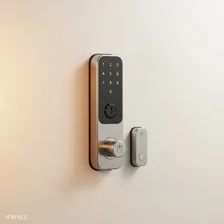
Smart locks replace traditional mechanical deadbolts with electronic locks that can be unlocked via smartphone, keypad, fingerprint, voice, or geofencing. The category includes full deadbolt replacements (Yale, Schlage, August, Aqara), retrofit modules that add smart capability to existing locks (August, Wyze), and lever-style smart locks for interior doors. Door and window sensors complete the system by detecting opening events and integrating with security platforms.
The case for smart locks goes beyond convenience. They eliminate lost-key emergencies, allow temporary access codes for guests and service workers (with full logging of who entered when), and integrate with broader home automation (lights turn on when the door unlocks, the alarm disarms automatically when a recognised code is used). The case against is that they introduce new failure modes — dead batteries, software bugs, network failures — that traditional mechanical locks don't have. Most modern smart locks address this by including a physical key backup, which keeps you locked out only in unusual circumstances.